Current range guide · Updated 5 May 2026

Kyocera Printers, Multifunction Devices & Toner

Compare current Kyocera ECOSYS and TASKalfa devices by A4 or A3 format, mono or colour output, print speed, recommended monthly volume, Wi-Fi, touchscreen, fax and scanning method. Every current ECOSYS model is connected to its matching DeviceDeal product page.

36current ECOSYS models mapped
23current TASKalfa models compared
21–105ppm classes shown in the supplied guide
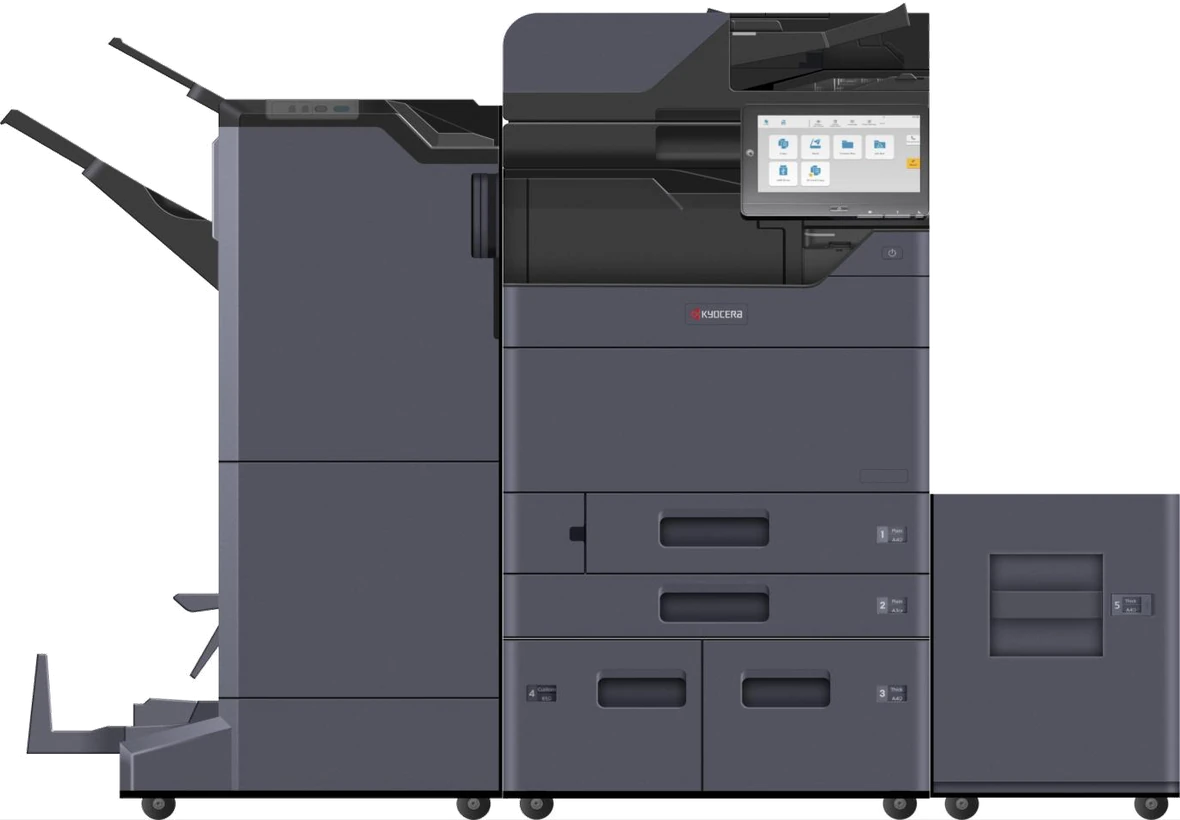
Kyocera TASKalfa high-volume multifunction system with finishing and side-deck options
Start with the requirement

A clearer way to choose a Kyocera printer

Choose the paper size, output type and functions first. Then use print speed and the recommended monthly volume shown in Kyocera’s May 2026 guide to narrow the range. Current DeviceDeal price and stock remain controlled by the separate Kyocera product catalogue.

  • Compare A4 and A3 models without reading a small PDF chart.
  • Separate print-only devices from multifunction print, copy and scan models.
  • Identify built-in, optional and unavailable Wi-Fi before opening a product page.
  • Understand single-sided, RADF and one-pass dual scanning.
  • Use official Kyocera data sheets for complete technical detail.
Source basis:Range specifications, warranty labels, replacement models, model-name definitions, cloud solutions, support and security notes are based on the supplied Kyocera Range Guide last updated 05/05/26. DeviceDeal product links and catalogue names come from the supplied 404-row product export.
Choose a starting point

What type of Kyocera device do you need?

Select a requirement to open the ECOSYS finder with a useful starting filter. TASKalfa project systems have their own detailed section below.

Interactive ECOSYS selector

Find current Kyocera ECOSYS models

Filter the 36 current ECOSYS models shown in the supplied guide. The results use DeviceDeal product URLs from the supplied export and do not hard-code price or availability.

ECOSYS model finder

Start broad, then refine by paper size, output, function, Wi-Fi, scan method, speed or workload.

36 CURRENT MODELS
Showing eight starting models.
Full current ECOSYS comparison

Compare every current ECOSYS model in the guide

Open either table for a full model-by-model view. On mobile, each row changes into a labelled card so the information remains readable without horizontal page scrolling.

ECOSYS print-only models 17 current A4 and A3 mono or colour printers
ModelFormatSpeedRecommended monthly volumeWi-FiTouchscreenWarrantyPrevious modelLinks
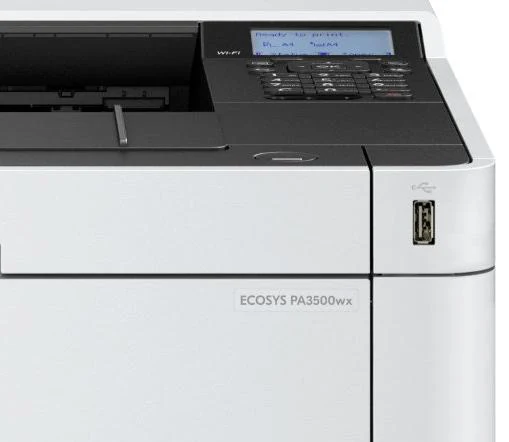
PA3500xA4 Mono
Print only
35 ppm2,000NoNo2-year return to baseP2235dnShopData sheet
PA4000xA4 Mono
Print only
40 ppm2,000NoNo2-year return to baseP2040dnShopData sheet
PA4000wxA4 Mono
Print only
40 ppm2,000Built-inNo2-year return to baseP2040dwShopData sheet
PA4500xA4 Mono
Print only
45 ppm3,000Optional IB-37No2-year onsiteP3145dnShopData sheet
PA5000xA4 Mono
Print only
50 ppm4,000Optional IB-37No2-year onsiteP3150dnShopData sheet
PA5500xA4 Mono
Print only
55 ppm5,000Optional IB-37No2-year onsiteP3155dnShopData sheet
PA6000xA4 Mono
Print only
60 ppm6,000Optional IB-37No2-year onsiteP3260dnShopData sheet
P4140dnA3 Mono
Print only
40 ppm5,000Optional IB-36No2-year onsiteP4040dnShopData sheet
P4060dnA3 Mono
Print only
60 ppm30,000Optional IB-35Yes3-year onsiteFS9530dnShopData sheet
PA2101cxA4 Colour
Print only
21 ppm600NoYes2-year return to basePA2100cxShopData sheet
PA2101cwxA4 Colour
Print only
21 ppm600Built-inYes2-year return to basePA2100cwxShopData sheet
PA2600cxA4 Colour
Print only
26 ppm900NoYes2-year return to baseP5026cdnShopData sheet
PA2600cwxA4 Colour
Print only
26 ppm900Built-inYes2-year return to baseP5026cdwShopData sheet
PA3500cxA4 Colour
Print only
35 ppm2,000Optional IB-37No2-year onsiteP6230cdnShopData sheet
PA4000cxA4 Colour
Print only
40 ppm3,000Optional IB-37No2-year onsiteP6235cdnShopData sheet
PA4500cxA4 Colour
Print only
45 ppm15,000Optional IB-37No2-year onsiteP7240cdnShopData sheet
P8060cdnA3 Colour
Print only
60 ppm30,000Optional IB-35Yes3-year onsiteP8650cdnShopData sheet
ECOSYS multifunction models 19 current A4 and A3 mono or colour multifunction devices
ModelFormatSpeedRecommended monthly volumeWi-FiTouchscreenFaxScanningWarrantyPrevious modelLinks
MA3501wfxA4 Mono
Multifunction
35 ppm2,000Built-inYesYesSingle-sided only2-year return to baseM2735dwShopData sheet
MA4000xA4 Mono
Multifunction
40 ppm2,000NoNoNoDual scan2-year return to baseM2040dnShopData sheet
MA4000fxA4 Mono
Multifunction
40 ppm2,000NoNoYesDual scan2-year return to baseM2540dnShopData sheet
MA4000wifxA4 Mono
Multifunction
40 ppm2,000Built-inYesYesDual scan2-year return to baseM2640idwShopData sheet
MA4500fxA4 Mono
Multifunction
45 ppm3,000Optional IB-37NoYesRADF2-year onsiteM3645dnShopData sheet
MA4500ifxA4 Mono
Multifunction
45 ppm3,000Optional IB-37YesYesRADF2-year onsiteM3645idnShopData sheet
MA5500ifxA4 Mono
Multifunction
55 ppm5,000Optional IB-37YesYesDual scan2-year onsiteM3655idnShopData sheet
MA6000ifxA4 Mono
Multifunction
60 ppm6,000Optional IB-37YesYesDual scan3-year onsiteM3860idnShopData sheet
MZ3201ixA3 Mono
Multifunction
32 ppm5,000Optional IB-37YesOptionalRADF3-year onsiteM4132idnShopData sheet
MA2101cfxA4 Colour
Multifunction
21 ppm600NoYesYesSingle-sided only2-year return to baseMA2100cfxShopData sheet
MA2101cwfxA4 Colour
Multifunction
21 ppm600Built-inYesYesSingle-sided only2-year return to baseMA2100cwfxShopData sheet
MA2600cfxA4 Colour
Multifunction
26 ppm900NoYesYesDual scan2-year return to baseM5526cdn / M5526cdw / M5526cdw/aShopData sheet
MA2600cwfxA4 Colour
Multifunction
26 ppm900Built-inYesYesDual scan2-year return to baseM5526cdn / M5526cdw / M5526cdw/aShopData sheet
MA2600cwxA4 Colour
Multifunction
26 ppm900Built-inYesNoDual scan2-year return to baseM5526cdn / M5526cdw / M5526cdw/aShopData sheet
MA3500cixA4 Colour
Multifunction
35 ppm2,000Optional IB-37YesNoDual scan2-year onsiteM6230cidnShopData sheet
MA3500cifxA4 Colour
Multifunction
35 ppm2,000Optional IB-37YesYesDual scan2-year onsiteM6630cidnShopData sheet
MA4000cifxA4 Colour
Multifunction
40 ppm3,000Optional IB-37YesYesDual scan2-year onsiteM6635cidnShopData sheet
M8124cidnA3 Colour
Multifunction
24 ppm4,000Optional IB-36YesOptionalRADF3-year onsiteFS-8520mfpShopData sheet
M8130cidnA3 Colour
Multifunction
30 ppm4,000Optional IB-36YesOptionalRADF3-year onsiteFS-8525mfpShopData sheet
Warranty labels:The table reproduces the return-to-base and onsite warranty descriptions shown in the May 2026 Kyocera range chart. Review the official data sheet, warranty terms and live product page for the exact model before purchase.
Business and high-volume systems

Kyocera TASKalfa range and configuration guide

The supplied DeviceDeal export does not contain exact listings for the 23 current TASKalfa models shown in the May 2026 guide. This section therefore uses official Kyocera product and data-sheet links, with DeviceDeal project-quote calls to action rather than unsupported prices or availability.

Kyocera TASKalfa MZ3200i multifunction system

Mono A3 TASKalfa

Eight models from 32 to 105ppm, including two-drawer, four-drawer and high-volume systems with model-dependent scanning, paper and finishing options.

Kyocera TASKalfa 408ci colour multifunction system

Colour A4 TASKalfa

Six current 30 to 45ppm models, including print-only, built-in DSDP, built-in RADF and configurable finishing choices.

Kyocera TASKalfa MZ7001ci colour multifunction system

Colour A3 TASKalfa

Nine current 25 to 95ppm systems with two-drawer and four-drawer chassis, scanning choices, side decks and model-dependent finishing or folding.

Need a configured TASKalfa project quote?

Include expected monthly volume, A4 or A3 requirements, colour or mono output, scan method, tray capacity and any fax, Wi-Fi, finishing, inserting or folding requirements.

Request a DeviceDeal quote
TASKalfa mono A3 models Eight models from 32 to 105ppm
ModelSpeedRecommended monthly volumeScanning / functionPaper configurationAvailable optionsPrevious modelLinks
MZ3200i
Mono A3 - 2-drawer
32 ppm5,000RADF / DSDP optionsMain unit: 2 x 500-sheet trays; additional two-tray optionsWi-Fi, fax and finishing availableTASKalfa 3212iKyocera pageData sheet
MZ4000i
Mono A3 - 2-drawer
40 ppm7,000RADF / DSDP optionsMain unit: 2 x 500-sheet trays; additional two-tray optionsWi-Fi, fax and finishing availableTASKalfa 4012iKyocera pageData sheet
MZ5001i
Mono A3 - 4-drawer
50 ppm10,000RADF / DSDP optionsMain unit: 2 x 500-sheet trays; additional two-tray and side-deck optionsWi-Fi, fax, finishing and folding availableTASKalfa 5004iKyocera pageData sheet
MZ6001i
Mono A3 - 4-drawer
60 ppm15,000RADF / DSDP optionsMain unit: 2 x 500-sheet trays; additional two-tray and side-deck optionsWi-Fi, fax, finishing and folding availableTASKalfa 6004iKyocera pageData sheet
MZ7001i
Mono A3 - 4-drawer
70 ppm20,000RADF / DSDP optionsMain unit: 2 x 500-sheet trays; additional two-tray and side-deck optionsWi-Fi, fax, finishing and folding availableTASKalfa 7004iKyocera pageData sheet
MZ7500i
Mono A3 high volume
75 ppmTBCBuilt-in 500-sheet DSDPMain unit: 4 x 500-sheet trays; additional A3 and A4 side decksWi-Fi, fax, inserting, finishing and Z-folding optionsAll newKyocera pageData sheet
MZ9500i
Mono A3 high volume
90 ppmTBCBuilt-in 500-sheet DSDPMain unit: 4 x 500-sheet trays; additional A3 and A4 side decksWi-Fi, fax, inserting, finishing and Z-folding optionsTASKalfa 9003iKyocera pageData sheet
MZ10500i
Mono A3 high volume
105 ppmTBCBuilt-in 500-sheet DSDPMain unit: 4 x 500-sheet trays; additional A3 and A4 side decksWi-Fi, fax, inserting, finishing and Z-folding optionsAll newKyocera pageData sheet
TASKalfa colour A4 models Six models from 30 to 45ppm
ModelSpeedRecommended monthly volumeScanning / functionPaper configurationAvailable optionsPrevious modelLinks
PA4500ci
Colour A4
45 ppm5,000Printer only1 x 500-sheet trayDealer-exclusive model; no finisher; optional Wi-FiAll newKyocera pageData sheet
MA3500ci
Colour A4
35 ppm2,000Built-in DSDP1 x 250-sheet trayDealer-exclusive model; no finisher; optional Wi-FiTASKalfa 352ciKyocera pageData sheet
MA4500ci
Colour A4
45 ppm5,000Built-in DSDP1 x 500-sheet trayDealer-exclusive model; no finisher; optional Wi-FiAll newKyocera pageData sheet
308ci
Colour A4
30 ppm3,000Built-in RADFMain unit: 1 x 500-sheet tray; additional 500- or 2,000-sheet optionsNo finisher; optional Wi-Fi and faxTASKalfa 307ciKyocera pageData sheet
358ci
Colour A4
35 ppm4,000RADF / DSDP optionsMain unit: 1 x 500-sheet tray; additional 500- or 2,000-sheet optionsFinishing available; optional Wi-Fi and faxTASKalfa 356ciKyocera pageData sheet
408ci
Colour A4
40 ppm5,000RADF / DSDP optionsMain unit: 1 x 500-sheet tray; additional 500- or 2,000-sheet optionsFinishing available; optional Wi-Fi and faxTASKalfa 406ciKyocera pageData sheet
TASKalfa colour A3 models Nine models from 25 to 95ppm
ModelSpeedRecommended monthly volumeScanning / functionPaper configurationAvailable optionsPrevious modelLinks
MZ2501ci
Colour A3 - 2-drawer
25 ppm4,000RADF / DSDP options; faster scanning listed for 40ppm and aboveMain unit: 2 x 500-sheet trays; additional two-tray or cabinet and side-deck optionsWi-Fi, fax, finishing and folding availableTASKalfa 2554ciKyocera pageData sheet
MZ3501ci
Colour A3 - 2-drawer
35 ppm5,000RADF / DSDP options; faster scanning listed for 40ppm and aboveMain unit: 2 x 500-sheet trays; additional two-tray or cabinet and side-deck optionsWi-Fi, fax, finishing and folding availableTASKalfa 3554ciKyocera pageData sheet
MZ4001ci
Colour A3 - 2-drawer
40 ppm7,000RADF / DSDP options; faster scanning listed for 40ppm and aboveMain unit: 2 x 500-sheet trays; additional two-tray or cabinet and side-deck optionsWi-Fi, fax, finishing and folding availableTASKalfa 4054ciKyocera pageData sheet
MZ5001ci
Colour A3 - 2-drawer
50 ppm10,000RADF / DSDP options; faster scanning listed for 40ppm and aboveMain unit: 2 x 500-sheet trays; additional two-tray or cabinet and side-deck optionsWi-Fi, fax, finishing and folding availableTASKalfa 5054ciKyocera pageData sheet
MZ6001ci
Colour A3 - 2-drawer
60 ppm15,000RADF / DSDP options; faster scanning listed for 40ppm and aboveMain unit: 2 x 500-sheet trays; additional two-tray or cabinet and side-deck optionsWi-Fi, fax, finishing and folding available; Z-folding option listed for 60 and 70ppm modelsTASKalfa 6054ciKyocera pageData sheet
MZ7001ci
Colour A3 - 2-drawer
70 ppm20,000RADF / DSDP options; faster scanning listed for 40ppm and aboveMain unit: 2 x 500-sheet trays; additional two-tray or cabinet and side-deck optionsWi-Fi, fax, finishing and folding available; Z-folding option listed for 60 and 70ppm modelsTASKalfa 7054ciKyocera pageData sheet
MZ7500ci
Colour A3 - 4-drawer
70 ppmTBCBuilt-in 500-sheet DSDPMain unit: 4 x 500-sheet trays; additional A3 and A4 side decksWi-Fi, fax, finishing, inserting and Z-folding optionsTASKalfa 7353ciKyocera pageData sheet
MZ8500ci
Colour A3 - 4-drawer
85 ppmTBCBuilt-in 500-sheet DSDPMain unit: 4 x 500-sheet trays; additional A3 and A4 side decksWi-Fi, fax, finishing, inserting and Z-folding optionsTASKalfa 8353ciKyocera pageData sheet
MZ9500ci
Colour A3 - 4-drawer
95 ppmTBCBuilt-in 500-sheet DSDPMain unit: 4 x 500-sheet trays; additional A3 and A4 side decksWi-Fi, fax, finishing, inserting and Z-folding optionsAll newKyocera pageData sheet

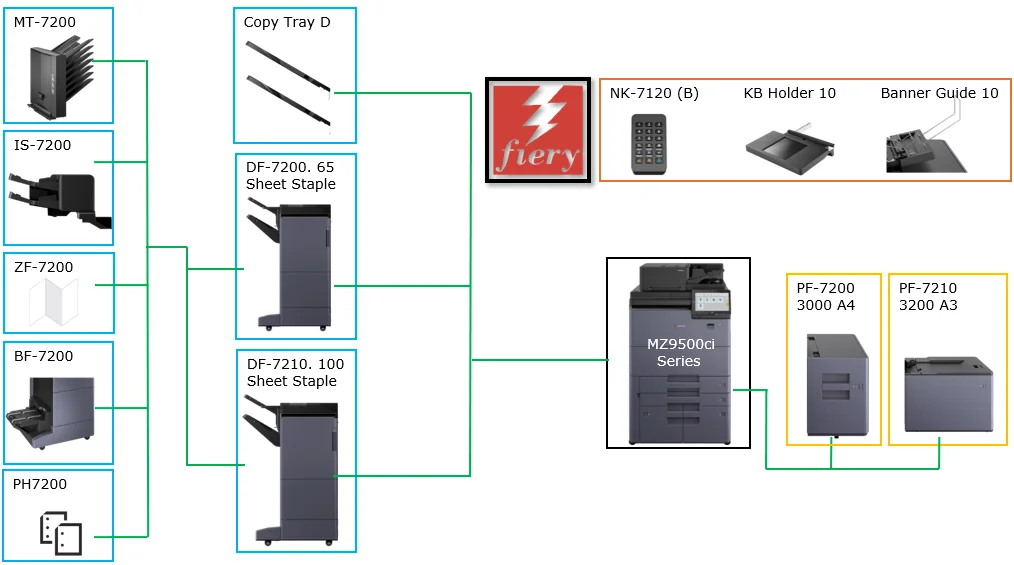
TASKalfa paper-handling and finishing diagrams

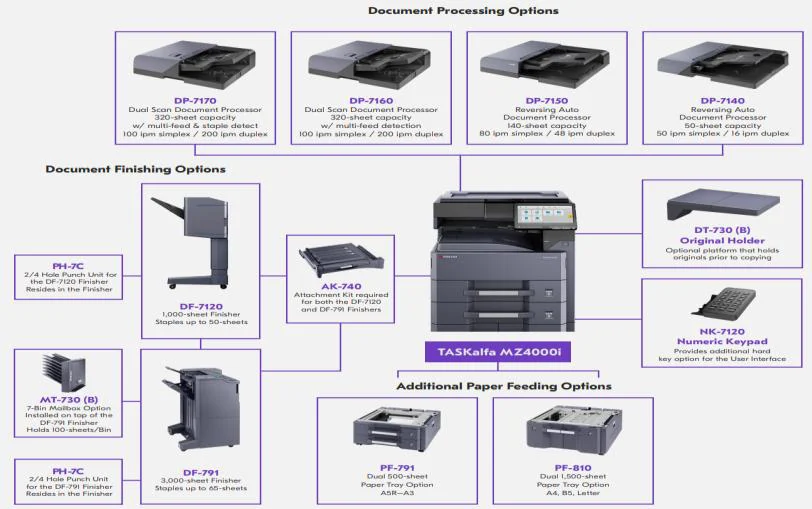
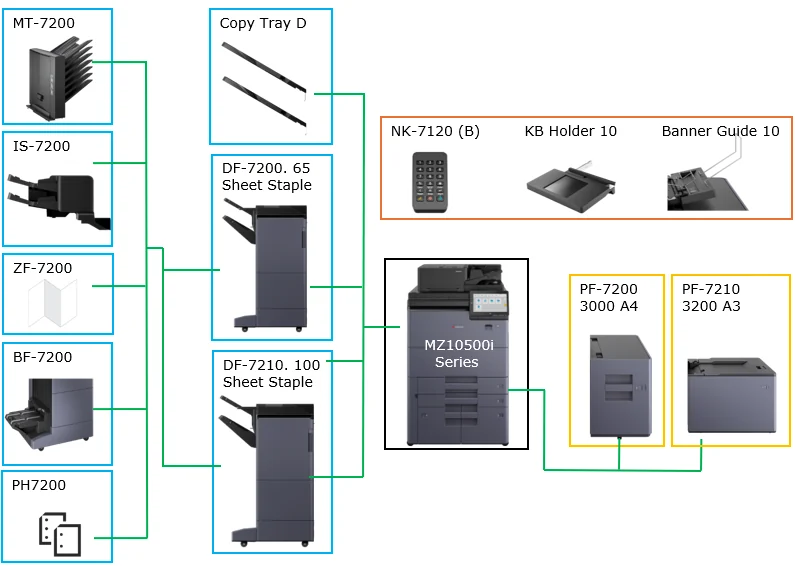
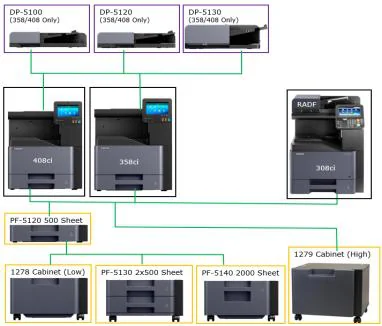
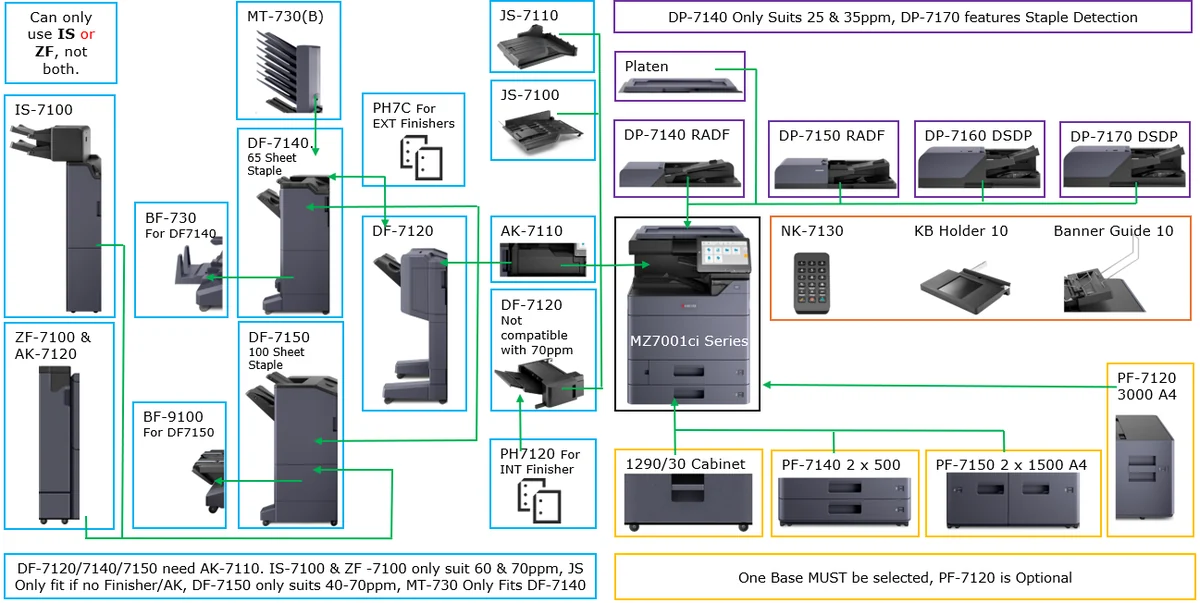
Open the supplied diagrams for a larger view. They are planning references only; the official data sheet should be used to confirm the exact supported configuration.

Understand the model code

How to read a Kyocera model name

The naming convention on page 7 of the supplied guide turns model codes into useful buying information.

Example: MA3500cifx

MA3500cifx
MultifunctionA435ppm classVersionColour · HyPAS · Fax · Duplex/network

The suffix can combine several functions. Older model names may use an earlier format, so use the comparison table and official data sheet when the code does not follow this pattern.

Type a current-style model code to see a plain-English breakdown.
CodeMeaning in the supplied guide
M / PMultifunction device / print-only device
A / ZA4 / A3
21, 35, 45…Print-speed class in pages per minute
cColour; no c indicates mono
iHyPAS enabled
fFax
xDuplex printing and network port
wWireless and network port
Kyocera cloud solutions

Document and fleet technology powered by the cloud

These are Kyocera solutions described in the supplied guide. Availability, licensing and device compatibility must be confirmed with Kyocera for the intended deployment.

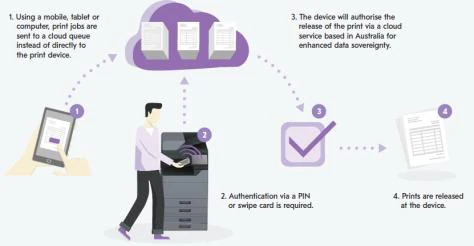
Illustration of a user releasing a document from a Kyocera cloud print queue

Kyocera Cloud Print & Scan

Kyocera describes KCPS as a cloud print-and-scan platform with secure print release through usernames and passwords, PINs or swipe cards, plus group print policies and visibility across print activity.

Official Kyocera information
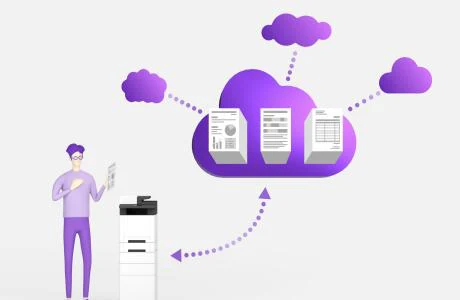
Illustration of documents stored in a central cloud environment

Kyocera Cloud Information Manager

KCIM is described as a centralised cloud document environment with attributes, labels, indexing, content search, digital signing, audit trails and version-controlled access.

Official Kyocera information
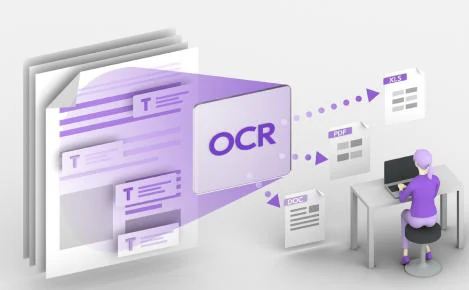
Illustration of OCR and scan-to-cloud document capture

Kyocera Cloud Capture

The guide describes KCC as scan-to-cloud technology with OCR and indexing for third-party platforms including Google Drive, SharePoint, OneDrive and Dropbox on compatible HyPAS scanning devices.

Official Kyocera information
Cloud device-management icon used for Kyocera Fleet Services

Kyocera Fleet Services

Kyocera describes KFS as a vendor-agnostic cloud device-management platform with remote meter readings, toner-delivery workflows, remote maintenance, automatic updates and print-policy controls.

Official Kyocera information
Dated technical guidance

Security, OAuth 2.0, drivers and support

The supplied guide includes Australian security and Microsoft authentication information. Use the official Kyocera links for the latest status because security requirements and platform schedules can change.

Kyocera printer showing a device password label location

Australian Cyber Security Rules 2025

Kyocera’s May 2026 guide says affected A4 printers and multifunction devices will ship with a Statement of Compliance and a unique password in the box. It also describes requirements around universal default passwords, vulnerability reporting and product-support disclosure.

Read Kyocera’s current security information

OAuth 2.0 authentication

The guide says Kyocera introduced OAuth 2.0 support across new devices to provide token-based authentication for email workflows as Microsoft retires Basic Authentication. Confirm the exact supported model and configuration on Kyocera’s current OAuth 2.0 page.

Check the supported-device information
Source date:5 May 2026. Treat this as a dated summary, not permanent deployment advice.
Complete the printer setup

Kyocera toner, paper handling and support products

The supplied product export includes printers, toner, paper feeders, cabinets, warranty products and related items. Use exact model or supply codes when checking compatibility.

Genuine toner and consumables

Search by the exact printer model or toner code, then confirm compatibility on the DeviceDeal product listing or official data sheet.

Browse Kyocera consumables

Paper trays, cabinets and finishing

Use the ECOSYS tray examples and TASKalfa diagrams as planning references. Exact support depends on the device and configuration.

Review paper and finishing diagrams

Current price and stock

The separate DeviceDeal Kyocera catalogue remains the source for price, stock and purchasable options. This main information page intentionally avoids hard-coded commercial data.

Shop current Kyocera products

Need help matching a Kyocera model to a business requirement?

Send DeviceDeal the paper size, colour or mono preference, expected monthly volume, required functions and any tray or finishing needs.

Kyocera printer questions

Frequently asked questions

Answers are based on the supplied May 2026 Kyocera range guide, the supplied DeviceDeal product export and the separate DeviceDeal Kyocera catalogue.

Choosing a Kyocera printer

What is the difference between the Kyocera ECOSYS and TASKalfa ranges?

In the supplied May 2026 range guide, ECOSYS covers current print-only and multifunction models across A4 and selected A3 requirements. TASKalfa covers broader business systems, including A3, higher-volume configurations, paper decks and finishing options. Use the model tables and official data sheets to confirm the configuration required for a specific project.

How many current models are covered on this page?

This page maps the 36 current ECOSYS models and 23 current TASKalfa models shown in the Kyocera range guide updated 5 May 2026. Current ECOSYS models link to matching DeviceDeal product pages from the supplied product export. TASKalfa models link to official Kyocera information and a DeviceDeal project-quote path.

Which Kyocera models have built-in Wi-Fi in the supplied ECOSYS guide?

The current ECOSYS models shown with built-in Wi-Fi are PA4000wx, PA2101cwx, PA2600cwx, MA3501wfx, MA4000wifx, MA2101cwfx, MA2600cwfx and MA2600cwx. Several other models list an optional IB-35, IB-36 or IB-37 wireless interface.

Which current ECOSYS models support A3 paper?

The A3 ECOSYS models in the guide are P4140dn, P4060dn, P8060cdn, MZ3201ix, M8124cidn and M8130cidn. TASKalfa also includes extensive mono and colour A3 ranges.

What replaced the Kyocera M4125 and M4132idn?

The May 2026 Kyocera range guide states that the M4125 and M4132idn were discontinued and replaced by the ECOSYS MZ3201ix.

Which models are marked as discontinued in the supplied range update?

The guide marks ECOSYS FS-1061dn and MA2000w, plus TASKalfa 2020 and TASKalfa 2321, as discontinued. It separately states that M4125 and M4132idn were replaced by MZ3201ix.

What does recommended monthly volume mean on this page?

Recommended monthly volume is the comparison figure published in the supplied range guide. Use it to shortlist models around the expected workload, then review the official data sheet and project requirements before selecting a device. It is not presented here as a maximum duty-cycle figure.

What is the difference between single-sided, RADF and dual-scan document processing?

Single-sided scanning reads one side of the paper. RADF provides duplex scanning by passing the sheet through twice. Dual scan, also called DSDP in the TASKalfa tables, scans both sides in one pass.

Functions and model names

Which ECOSYS multifunction models include fax?

Fax availability depends on the exact model. Models with an “f” in the suffix generally indicate fax in the supplied naming guide, while some A3 models list fax as optional. The comparison table shows Yes, No or Optional for each current ECOSYS multifunction model.

What does the letter M mean in a Kyocera model name?

The supplied Kyocera naming convention uses M for a multifunction device and P for a print-only device.

What do A and Z mean in a Kyocera model name?

In the supplied naming convention, A identifies an A4 device and Z identifies an A3 device.

What does c mean in a Kyocera model suffix?

The letter c indicates colour. The absence of c indicates a mono model in the naming convention shown in the range guide.

What do i, f, x and w mean in a Kyocera model suffix?

The guide identifies i as HyPAS enabled, f as fax, x as duplex printing with a network port, and w as wireless with a network port.

What is HyPAS?

The supplied naming guide describes models with an i suffix as HyPAS enabled, meaning they can run software. Exact software support should be checked on the official product page or data sheet.

Do all Kyocera printers on this page have a touchscreen?

No. Touchscreen availability varies by model. The current ECOSYS comparison tables show the touchscreen status for each print-only and multifunction device.

Can TASKalfa systems be configured with finishing and folding?

Selected TASKalfa ranges list finishing, inserting, folding or Z-folding options. Availability depends on the model and configuration, so the official data sheet and the accessory diagrams should be reviewed before a project quote is finalised.

TASKalfa, support and purchasing

Where can I find Kyocera printer drivers and manuals?

Use the official Kyocera Download Centre linked in the support section. The supplied guide describes it as the location for drivers, user manuals, installation guides, product documentation, network tools and utilities.

What is Kyocera PrintNAV?

PrintNAV is Kyocera’s online printer selector. The supplied guide says it considers factors such as print volume, document type and business applications to provide model recommendations.

What does the supplied guide say about Australian Cyber Security Rules 2025?

Kyocera’s May 2026 guide says affected A4 printers and multifunction devices will ship with a Statement of Compliance and a unique password in the box. Because this is dated security information, use the official Kyocera security page linked below for the latest details.

Does Kyocera support OAuth 2.0 for multifunction email workflows?

The supplied guide says Kyocera introduced OAuth 2.0 authentication support across new devices to support secure token-based email workflows as Microsoft retires Basic Authentication. Check Kyocera’s official OAuth 2.0 page for the current supported-model list and deployment details.

How do I find toner for a Kyocera printer?

Open the separate DeviceDeal Kyocera catalogue, use its consumables filter and search by the exact printer model or toner code. Compatibility should be confirmed against the product listing or official data sheet before ordering.

Where can I see current DeviceDeal pricing and stock?

Use the separate DeviceDeal Kyocera catalogue and individual product pages. This main landing page intentionally does not hard-code prices or stock, so the catalogue remains the source for live commercial information.

How do I request a quote for a TASKalfa system?

Use the DeviceDeal Request Quote button and include the required model, expected monthly volume, paper size, scanning needs, tray capacity and any finishing, folding, inserting, Wi-Fi or fax requirements.

Where do I get warranty and service support?

The supplied Kyocera guide lists Customer.Support@dau.kyocera.com and 135 962 for warranty and service enquiries, and asks customers to provide the serial number, model number and fault description. DeviceDeal’s Warranty & Technical Support page is also linked below.